Warning
This document is for an in-development version of Galaxy. You can alternatively view this page in the latest release if it exists or view the top of the latest release's documentation.
26.0 Galaxy Release (March 2026)

Please see the full release notes for more details.
Highlights
Discover some of the most exciting new capabilities and improvements in Galaxy 26.0.
AI Comes to Galaxy!
Galaxy 26.0 brings artificial intelligence directly into the Galaxy experience, expanding how users explore data, discover tools, and troubleshoot analyses.
GalaxyAI: Intelligent Assistance Inside Galaxy
Galaxy introduces GalaxyAI, a built in AI assistant integrated directly into the interface.
Conversational help. Ask questions about tools, workflows, results, or errors without leaving Galaxy.
Error analysis guidance. Receive contextual explanations and suggestions when jobs fail.
Tool recommendations. Describe your analysis goal and get suggestions tailored to the tools installed on your Galaxy instance.
Training discovery. Find relevant Galaxy Training Network tutorials directly from within Galaxy.
Extensible architecture. Built on a flexible agent framework designed to grow with additional specialized AI capabilities over time.
GalaxyAI provides a conversational entry point to Galaxy’s AI capabilities and lays the groundwork for connecting Galaxy users to an expanding set of intelligent capabilities. [#21434]
AI Assisted Notebooks with JupyterLite
Galaxy 26.0 strengthens integration with JupyterLite, bringing AI enhanced notebooks directly into your browser.
Browser based notebooks. Launch lightweight, interactive notebooks connected to Galaxy data.
AI powered exploration. Use AI assistance within notebooks to prototype analyses and accelerate exploration.
Seamless data access. Work with Galaxy datasets without manual downloads or complex setup.
Shared AI services. Notebook AI features use Galaxy’s configured AI services for consistent behavior and control.
This integration makes interactive, AI supported analysis a natural extension of Galaxy workflows. [#21463]
AI Powered Data Visualization with Vintent
Galaxy introduces Vintent, an AI driven visualization engine for generating interactive charts from your data.
Natural language to visualization. Turn requests into structured, validated charts.
Modern Vega Lite charts. Create expressive and interactive visualizations directly within Galaxy.
Integrated with Galaxy datasets. Visualizations operate directly on your data without extra preparation.
Reproducible browser based Python runtime. Data transformations run in a versioned Pyodide environment directly in the browser.
Consistent, versioned environments. Visualization logic uses pinned dependencies, making environments portable, reproducible, and easy to evolve independently.
By combining AI reasoning with a portable and reproducible Python runtime in the browser, Vintent expands Galaxy’s visualization ecosystem while preserving flexibility and isolation. [#21586]
A Redesigned ToolShed Landing Experience
The ToolShed landing page has been redesigned to make tool discovery clearer and more focused.
Prominent search box. Quickly find Galaxy tools from a central search interface.
Clear guidance sections. Learn how to find, install, publish, and cite tools.
Streamlined layout. A simplified two column design highlights essential information and recent repositories.
These improvements make exploring and managing Galaxy tools more intuitive for both new and experienced users. [#21430]
Automated Actions When Workflows Finish
Galaxy 26.0 adds configurable actions that automatically execute when a workflow completes.
Automatic result export. Send workflow outputs to remote file sources such as cloud storage.
Completion notifications. Receive alerts when long running workflows finish.
Configurable at launch. Select post run actions directly in a new On Completion section of the workflow run form.
Track recent exports. Monitor export status and review recent transfers from within Galaxy.
These features streamline post analysis workflows and reduce manual follow up steps. [#21532]
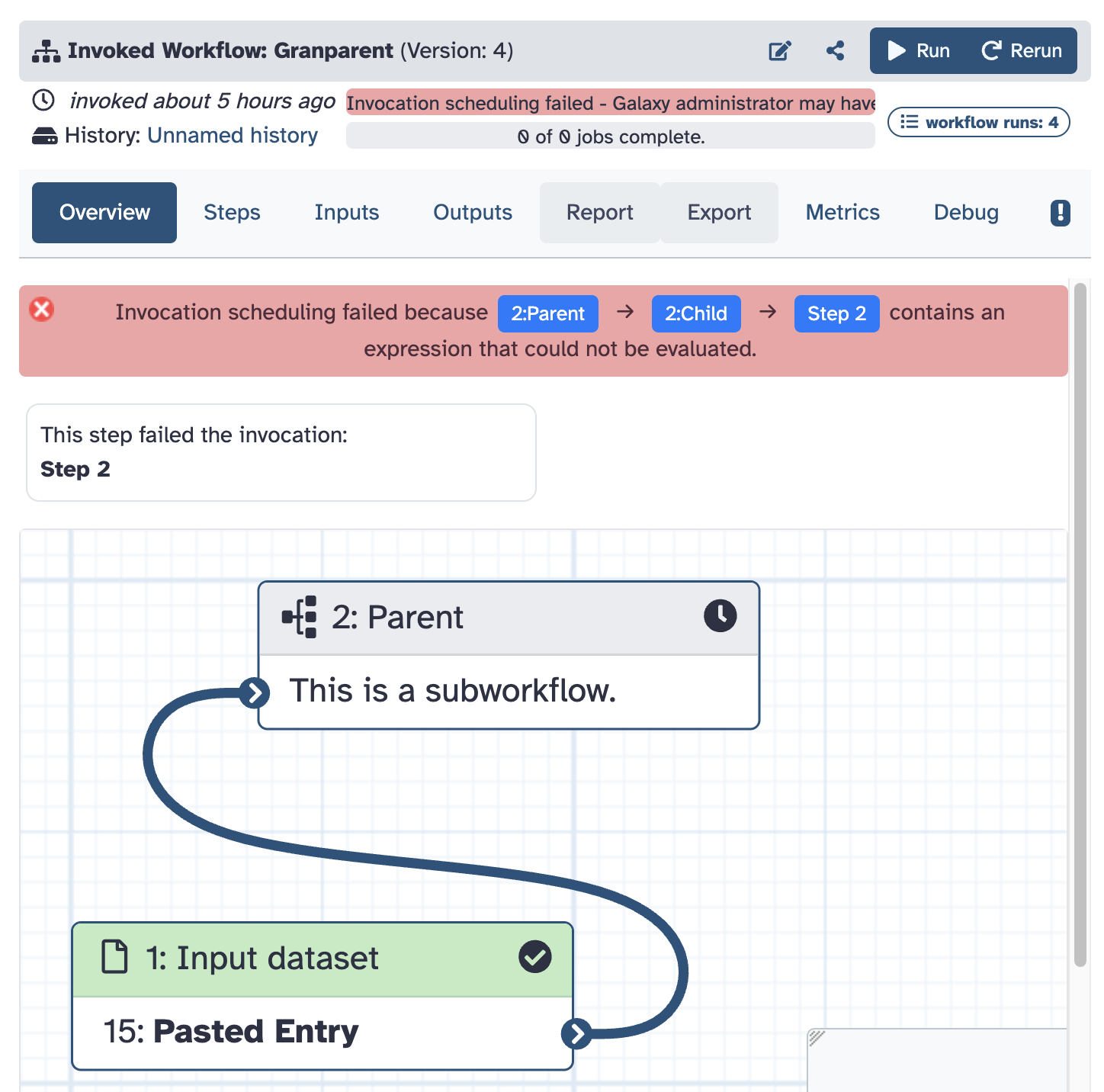
Improved Workflow Error Navigation
Debugging complex workflows is now easier with clearer and more actionable failure hints. [#21514]
Clickable failure paths. Navigate directly to the exact failing step, even within subworkflows.
More precise step hints. See clearer guidance on where and why a failure occurred.
Faster troubleshooting. Reduce time spent locating and diagnosing workflow issues.
Visualizations Updates
Update openlayers plugin (thanks to @guerler). Pull Request 22435
Bump tiffviewer visualization to v0.0.4 (thanks to @davelopez). Pull Request 22168
Selenium test cases for IGV (thanks to @jmchilton). Pull Request 21034
Remove Trackster (thanks to @guerler). Pull Request 20974
Add missing types to visualization model (thanks to @guerler). Pull Request 21672
Update dependencies for IGV and Plotly (thanks to @guerler). Pull Request 21543
Add Jupyternaut adapter for JupyterLite integration (thanks to @guerler). Pull Request 21463
Add plotly pie charts (thanks to @guerler). Pull Request 21174
Adds Vintent visualization plugin (thanks to @guerler). Pull Request 21586
Remove dummy header from JupyterLite requests (thanks to @guerler). Pull Request 21585
Datatypes Updates
Ensure
x-content-truncatedheader is string (thanks to @mvdbeek). Pull Request 22386Add new datatypes: .taf and .taf.gz (thanks to @Maed0x). Pull Request 22242
Sequence datatypes: only read first character per line for setting metadata (thanks to @bernt-matthias). Pull Request 22276
Merge 25 1 into dev (thanks to @mvdbeek). Pull Request 21067
Merge 25.1 into dev (thanks to @mvdbeek). Pull Request 21128
Remove Trackster (thanks to @guerler). Pull Request 20974
Add type annotations to job handling code (thanks to @nsoranzo). Pull Request 21171
Merge 25.1 into dev (thanks to @mvdbeek). Pull Request 21305
Slight improvement of mztab2 datatype (thanks to @nguilhot). Pull Request 21258
Add Sourmash sig new datatype (thanks to @SaimMomin12). Pull Request 21469
add new datatype for kmindex index data (thanks to @Smeds). Pull Request 21429
Add missing test file for sig datatype (thanks to @SaimMomin12). Pull Request 21473
Add missing ending newline to test.sig test data file (thanks to @nsoranzo). Pull Request 21485
Discriminate decompression tools (thanks to @mvdbeek). Pull Request 21510
Add missing dependencies to
galaxy-filespackage (thanks to @nsoranzo). Pull Request 21518Fix width and height assignment for image metadata using Pillow (thanks to @kostrykin). Pull Request 21554
Drop support for Python 3.9 (thanks to @nsoranzo). Pull Request 21583
Add new datatype pg and hg for pangenomics (thanks to @SaimMomin12). Pull Request 21620
Add initial support for the DICOM format (thanks to @kostrykin). Pull Request 21385
Merge 25.1 into dev (thanks to @guerler). Pull Request 21677
Remove tabular chunked, binary and large file mako (thanks to @guerler). Pull Request 21106
Infer type from extension for mzml (thanks to @bgruening). Pull Request 21033
Add Deacon idx format (thanks to @SantaMcCloud). Pull Request 21632
Add a few datatypes from the digital humanities domain (thanks to @bgruening). Pull Request 21596
Add new datatypes required for VG tool (thanks to @SaimMomin12). Pull Request 21644
Add amnis cif flow cytometry data type (thanks to @bernt-matthias). Pull Request 21829
Builtin Tool Updates
Include missing tools in stock_tool_paths (thanks to @jmchilton). Pull Request 22181
Update qiskit interactive tool (thanks to @thepineapplepirate). Pull Request 21948
Selenium test case for basic tools list functionality (thanks to @jmchilton). Pull Request 21059
remove a tool from sample that is no longer included in dist (thanks to @martenson). Pull Request 21371
Remove sanitization from built-in grep tool (thanks to @wm75). Pull Request 21648
Add new jupyter version (thanks to @bgruening). Pull Request 21531
Add missing filter_failed_collection_1.1.0.xml tool (thanks to @mvdbeek). Pull Request 21719
Fix data manager .loc file selection logic (thanks to @jdavcs). Pull Request 21664
Add builtin_converters section to integrated tool panel (thanks to @ahmedhamidawan). Pull Request 21838
Please see the full release notes for more details. The admin-facing release notes are available here.
To stay up to date with Galaxy’s progress, watch our screencasts; visit our community Hub; and follow us on Bluesky, Mastodon, and LinkedIn.
You can always chat with us on Matrix.
Thanks for using Galaxy!